Before we start: this is not a spec review. You will not find benchmarks or camera samples here. I moved from Android to an iPhone 13, and I use it every day. These are my notes on what surprised me, what annoyed me, what I got used to, and which other Apple devices are worth it for me.
If you think about a switch, read this as a list of things to check before you buy, not as a sales pitch.

Table of contents
Open Table of contents
Why did I switch?
Two reasons made me switch. A third reason came later, after I used the phone.
Long updates
An iPhone gets iOS updates for many years. On Android, the number of years depends on the brand and the model, and it is often hard to know before you buy. With an iPhone, I do not have to think about it. The phone keeps getting new features and security fixes, and I can keep it for a long time.
Camera and build quality
I wanted a phone that feels solid in the hand and takes good photos. The camera is the first item on my list of what I use the phone for, so it matters to me.
The surprise: the Apple ecosystem
The ecosystem means Apple devices that work together. I did not know how strong it is until I used it myself. Before the switch, it sounded like marketing to me. After the switch, I understood it. But I also learned that you do not need every device. I talk about that at the end.
What do I love about iOS?
The big features are not what won me. Small things did, because I use them every day.
A QR scanner inside the camera
You open the camera, point it at a QR code, and tap the link. There is no extra app to install and no ads. For example, on a restaurant menu, it saves you a few seconds.
A built-in document scanner
When I need a copy of a paper (a contract, a receipt, an ID), I scan it with the phone. The scanner finds the edges of the page and makes it flat and clean. I do not need a separate scanner app.
Live notifications
For a delivery, a taxi, or a route in maps, iOS shows a live status on the lock screen. I see where my order or my driver is without opening the app.
StandBy while charging
When the phone charges on its side, it turns into a small clock. It shows the time, my calendar, and more. On a desk, it works like a small second screen.
Apple Notes
Apple Notes is simple, fast, and it syncs between my devices. It is where I write my ideas first, including the notes behind this post.
Default apps
iOS lets you choose some default apps. I made two changes that help me every day:
- I set WhatsApp as my default messaging app. Now I can send my location to a delivery driver without saving their number.
- I set Google Authenticator as the default app for codes, so login codes go where I already keep them.
What annoyed me when I moved?
Some items on this list came from my Android habits. Others are real problems. Here is the full list, and where each item is today.
| Area | What happened | Now |
|---|---|---|
| Typing | Auto-correction is not good | ✅ You can turn it off |
| Translation | Apple Translate is good. Google Translate is better. | ✅ Fine |
| Background backup | It had problems | ✅ Fixed after iOS 18 |
| Unlocking | Two steps: unlock, then swipe up to get to the home screen | ✅ I got used to it |
| Notification control | You turn off notifications one app at a time | ✅ OK, but annoying when you install and remove a lot of apps |
| Mail notifications | No push notifications for Mail | ✅ For me, this is a feature: I read mail once or twice a day |
| Back navigation | No single back gesture in the whole system | ❌ Some popups close only when you force close the app |
| Truecaller | Does not work correctly | ❌ |
| Storage | You cannot clear the data or the cache of an app | ❌ |
Six of the nine items are now ✅. But the three ❌ items still annoy me.
The ones I got used to
Typing. The auto-correction changed words that I did not want to change. The fix was simple: I turned it off in the settings. Now the keyboard types what I type.
Translation. Apple Translate works, and it is built in. Google Translate is still better for me, so I installed it. Problem solved.
Background backup. At first, the backup in the background did not work well for me. After the iOS 18 update, the problem was gone.
Unlocking. On iPhone, you unlock with your face, and then you swipe up to get to the home screen. That is two steps instead of one. At first, it felt slow. Now I do not notice it.
Notification control. To turn off notifications, you go app by app. When you set up the phone once, it is fine. But if you install and remove apps a lot, you do it again and again, and it gets annoying.
Mail notifications. Apple Mail did not push new emails to me as they arrived. First, I thought that it was a bug. Then I saw it as a feature: I read my mail once or twice a day, and I do not get pulled into my inbox all day.
The three that still annoy me
Back navigation. On Android, one back gesture works everywhere. On iPhone, each app decides how “back” works. Most apps have a back button at the top left or a swipe from the left edge. But some popups have no close button and ignore the swipe. The only way out is to force close the app.
Truecaller. Truecaller shows you who calls before you answer. On iPhone, it does not work correctly for me. If caller ID is important to you, check this before you switch.
Storage. On Android, you can clear the cache or the data of one app. On iPhone, there is no option for that. If an app takes too much space, you must delete it and install it again.
Which Google apps do I still need?
Apple has its own app for each of these. I still use the Google app, and that is fine.
- Gmail, not Apple Mail.
- Google Maps, especially for local navigation, where it works better for me.
- YouTube. There is no Apple replacement for it.
- Google Translate. As I said above, it is better for me than Apple Translate.
If you think about a switch, this is good news: all four apps work well on iPhone. You do not lose your Google life when you leave Android.
What do I use my iPhone for?
My iPhone is not a gaming machine or a work computer. It is the tool that runs my day. I group what I do with it into four parts.
Daily life. Taxi and food orders, and government services. These are the apps that I open when I am out, so they must be fast and reliable.
Talking to people. Chats, mail, and my calendar. Most of my communication goes through the phone.
Money and mobile lines. I manage my mobile lines (WE, Orange and Vodafone) and my money apps (InstaPay, Telda, etc.) from the phone.
Fun. The camera and light games. For anything heavier, I use other devices.
Do you need the whole Apple ecosystem?
I saw how strong the Apple ecosystem is only after I used it myself. But you do not have to buy every device. Some devices are for special needs, and not everyone has those needs.
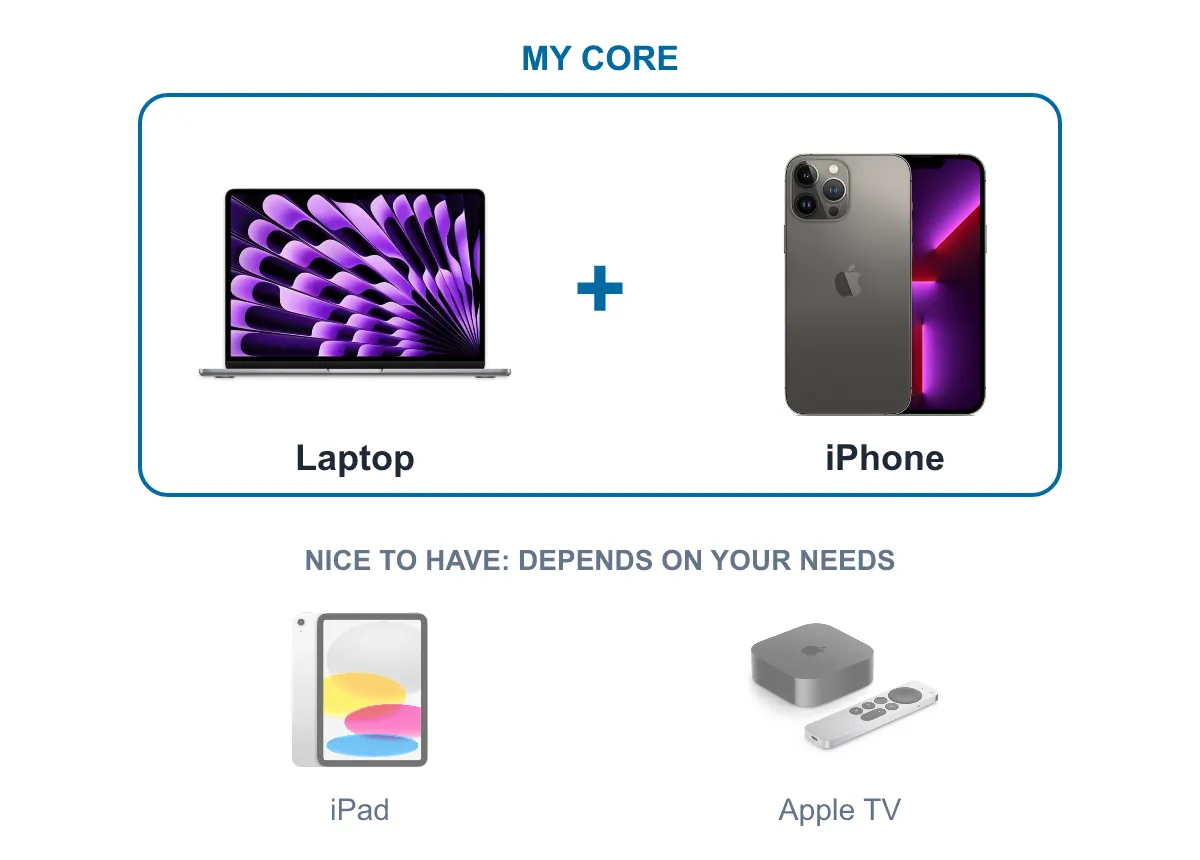
For me, a laptop and an iPhone are all I need. The rest is nice to have, and it depends on how you live.
My laptop: the MacBook Air
My laptop is a MacBook Air. Together with the iPhone, it is my core setup. But macOS is not perfect for me either. These are five things that I still miss on macOS:
- Clipboard management. I want to keep many copied items and paste an older one, not only the last one.
- Alt+Tab between windows. On macOS, Cmd+Tab switches between apps, not between windows. When an app has three windows open, it does not help me.
- Close the app with the X button. On macOS, the red button closes the window, but the app often keeps running in the background.
- Cut and paste files. In Finder, Ctrl+X and Ctrl+V do not move a file like they do on Windows. You copy the file and then use a different shortcut to move it.
- Keep awake after I close the lid. When I close the lid, the MacBook goes to sleep. Sometimes I want it to keep working, for example during a long download.
The iPad: nice to have
I use the iPad in two places: on the couch and in bed. It is the screen that I use when I relax. This is what I use it for most, in order:
- Reading: books and the web.
- Gaming: mobile games and emulators.
- Streaming: podcasts, YouTube, Apple TV+, Netflix, and anime.
- Notes.
- Learning.
- Exploring maps.
Look at that list again. My phone or my laptop can do every item on it. The iPad does them on a bigger screen and in a more comfortable way. That is why it is “nice to have” for me. If you do not read or watch a lot on the couch, you can skip it.
The Apple Watch and AirPods: not for me
Is the Apple Watch worth it for me? Short answer: no.

Photo by Dennis Brendel on Unsplash
The long answer depends on your lifestyle. Here is how each main feature works for me.
Health tracking. The watch reads your vitals, for example your heart rate, and keeps a history. For most people, this is the most useful feature. But I am not an athlete, and I do not want to track these numbers. Also, I ask myself if a cheaper tracker that works with the Apple Health app can do the same job.
Gym tracking. The watch tracks your workouts. Again, this is great if you train and want to see your progress. It does not change anything for me.
Payments. You can pay with the watch instead of the phone.
Calls. This is where the watch loses me. When you answer a call on the watch, it uses its loudspeaker. I prefer to answer with my phone, especially on public transportation. With AirPods, it does not get much better: I must take the AirPods out and connect them to the watch. The watch also stays connected to the phone over Bluetooth, and that uses more battery.
If you go out a lot or you train every day, your answer can be yes. Buy for your own needs, not for the full set.
So, am I staying?
Yes. Most of my complaints were Android habits, and I got used to them. Three problems are left: back navigation, Truecaller, and storage. They are not enough to make me go back.
If you think about a switch, do these three things first:
- Make a list of the apps that you cannot live without, and check that each one works on iPhone.
- Look at the three problems above. If one of them is a deal breaker for you, wait.
- Decide which Apple devices you really need. For me, it is a laptop and a phone. The rest can wait.
Before you switch, make a list of the apps that you cannot live without. For me, it was the Google apps, and they all work on iPhone.
What made you switch? Or what keeps you on Android?